

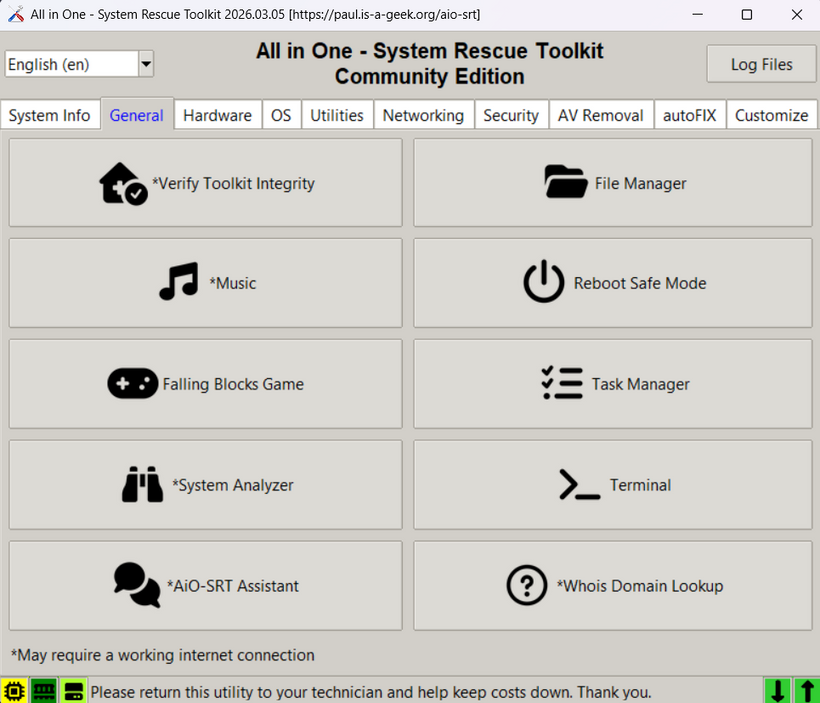
After many long hour days of working hard on the new 2026 version, I have finally released after 8 long years since the last update! Download from the project page here.
The toolkit has been completely rewritten and transformed from the Windows-only AutoHotKey to Python. It also comes with Windows and Linux binaries so you can perform repair tasks within Windows or Linux with the same familiar interface. The bootable live environment also is based on Linux for performing offline diagnostic and repair tasks.
I apologize in advance for any bugs encountered, please feel free to reach out on Patreon or Discord to provide feedback. It has been a monumental effort to bring you all this release and it is just me making it.
I have made a bunch of custom applications just for the toolkit such as a WiFi Analyzer, Network Discovery, and many more never before seen tools.
The new toolkit is tightly integrated with Patreon for some features. It comes in 3 flavors:
-
Community Edition – Free (no cost) forever, all tools are fully functional
-
Supporter Edition – Provides quality of life features for people that frequently use the toolkit such as automation through autoFIX. My website branding gets removed (no more link on desktop after every run) or all over the toolkit. The credits/ad splash screen isn’t shown at launch, and there is a new theme engine to customize the look.
-
Professional Edition – Customize the toolkit even further and call it whatever you want, with your own splash screen, website url, and advertisement splash screen.
With the new Patreon linked features, I specifically designed the toolkit so that technical support teams can share a single Patreon account across their staff. It can be run from a network share or multiple USBs distributed to technicians. The Patreon account holder can “lock” the branding before distributing to staff so it remains consistent within the organization.
Automation may not sound like much, but I designed all of these custom tools to be tools I wish I had during my 25-year IT career, simple and effective. All of my custom tools that support autoFIX automation have an automatic mode such as the Network Discovery, Disk Usage, WiFi Analyzer, etc. Reduce your hands-on time and collect valuable log files after the toolkit automation runs!
Multi-language support comes out of the box for all editions with emphasis on making sure all of my custom tools as well support multiple languages.